About me I've been a computer programmer since I first started typing in program listings on a Commodore Vic 20 when I was about 8. My hobbies include electronics, CNC manufacturing, photography, beer and winemaking.
I live with my wife and lots of left-over parts from unfinished projects in Lincoln, Nebraska, USA.]
Blog
6 February 2013, 14:59 UTCThe growth of Unicode over time
This graph shows the number of defined code points in unicode from its first
release in 1991 to the preset; the last data point is the number of code points
in Unicode 6.2 plus all characters from the "pipeline table" of proposed new
characters (retrieved January 2013). However, it is likely that only a subset
of those characters will be in the next unicode standard.28 June 2012, 16:24 UTCFriendlier unicode entry in rxvt-unicode
I recently was hanging out on #rxvt-unicode where a fellow user mentioned
that entering unicodes via the shift+ctrl+<hex digits> method was inconvenient.
He mentioned that some other program (which?) uses shift+ctrl+u followed by
hex digits. So I wrote a perl plugin for rxvt-unicode that does just that.1 February 2011, 16:33 UTCCustom compose sequences in X
In modern gnome-based Linux distributions, it's quite easy to enable
a compose key through the Keyboard Preferences window. However, I
had trouble finding information on how to define custom compose sequences
like compose+"inf" for ∞.
The answer is the ~/.XCompose file. Start by copying the default compose
file (/usr/share/X11/locale/en_US.UTF-8/Compose for me) to ~/.XCompose, and
then edit it to add any additional sequences that are desired. (You can
also remove any sequences you don't use, though it's not clear whether
there's any benefit to this. For example, I removed all "dead key" sequences)
Applications seem to read this file once at startup, so my testing generally
involves opening a new urxvt to verify the sequence works and inserts the
desired character.
The Character Map applet is quite useful for finding the desired characters.
Make sure your text editor is using the right character encoding (typically
UTF-8).
Here are some of the sequences I've found it useful to define:
<Multi_key> <i> <n> <f> : "∞"
<Multi_key> <p> <i>     : "π"
<Multi_key> <o> <h> <m> : "Ω"
It's also worth noting that you can define compose sequences that result in
entire strings:
<Multi_key> <m> <e> : "Jeff Epler <jepler@unpythonic.net>"
Update, May 2011: By default in certain locales including the en_US
locale, gtk+ uses its own hardcoded list of compose sequences. To get
~/.XCompose support in gtk+ applications, arrange to set GTK_IM_MODULE=xim in
the environment. Related: gnome bug 96053, where I found the answer
for how to get gtk/gnome apps to behave.
The growth of Unicode over time
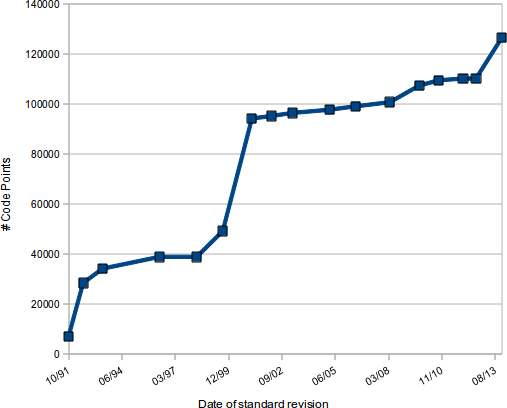
This graph shows the number of defined code points in unicode from its first release in 1991 to the preset; the last data point is the number of code points in Unicode 6.2 plus all characters from the "pipeline table" of proposed new characters (retrieved January 2013). However, it is likely that only a subset of those characters will be in the next unicode standard.
Friendlier unicode entry in rxvt-unicode
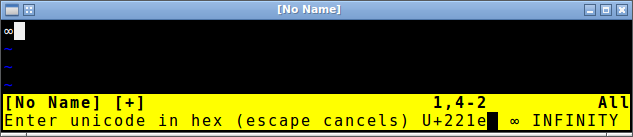
I recently was hanging out on #rxvt-unicode where a fellow user mentioned that entering unicodes via the shift+ctrl+<hex digits> method was inconvenient. He mentioned that some other program (which?) uses shift+ctrl+u followed by hex digits. So I wrote a perl plugin for rxvt-unicode that does just that.
Custom compose sequences in X
In modern gnome-based Linux distributions, it's quite easy to enable a compose key through the Keyboard Preferences window. However, I had trouble finding information on how to define custom compose sequences like compose+"inf" for ∞.
The answer is the ~/.XCompose file. Start by copying the default compose file (/usr/share/X11/locale/en_US.UTF-8/Compose for me) to ~/.XCompose, and then edit it to add any additional sequences that are desired. (You can also remove any sequences you don't use, though it's not clear whether there's any benefit to this. For example, I removed all "dead key" sequences)
Applications seem to read this file once at startup, so my testing generally involves opening a new urxvt to verify the sequence works and inserts the desired character.
The Character Map applet is quite useful for finding the desired characters.
Make sure your text editor is using the right character encoding (typically UTF-8).
Here are some of the sequences I've found it useful to define:
<Multi_key> <i> <n> <f> : "∞" <Multi_key> <p> <i> : "π" <Multi_key> <o> <h> <m> : "Ω"
It's also worth noting that you can define compose sequences that result in entire strings:
<Multi_key> <m> <e> : "Jeff Epler <jepler@unpythonic.net>"
Update, May 2011: By default in certain locales including the en_US locale, gtk+ uses its own hardcoded list of compose sequences. To get ~/.XCompose support in gtk+ applications, arrange to set GTK_IM_MODULE=xim in the environment. Related: gnome bug 96053, where I found the answer for how to get gtk/gnome apps to behave.
All older entries
Website Copyright © 2004-2024 Jeff Epler