About me I've been a computer programmer since I first started typing in program listings on a Commodore Vic 20 when I was about 8. My hobbies include electronics, CNC manufacturing, photography, beer and winemaking.
I live with my wife and lots of left-over parts from unfinished projects in Lincoln, Nebraska, USA.]
Blog
18 August 2021, 19:03 UTCUsing Adafruit Macropad as LinuxCNC Control Pendant
Update, 2021-09-25: For compatibility with CircuitPython 7.0.0
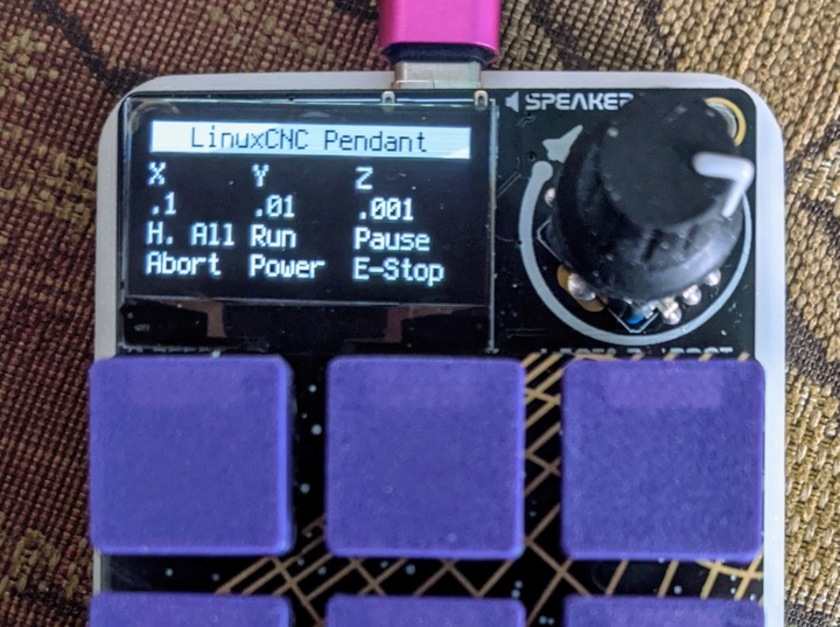
CircuitPython recently gained the power to have custom USB descriptors.
With these, we can define a USB HID device that will work with LinuxCNC's
hal_input.
For instance, the Adafruit
Macropad has a (very coarse, just 20 detents/revolution) encoder, 12 keyswitch
positions, and an OLED screen.
The two pieces of software below, when placed in the CIRCUITPY drive as boot.py
and code.py configure it for use with hal_input, using a halcmd line similar to
loadusr -W hal_input Macropad. I haven't actually done the
work of hooking it all the way up to Touchy yet, but it causes all the buttons
& the encoder to appear in halcmd show pin.
This is just the device I picked first; there's nothing to prevent you from
hooking up more exotic things like voltage/temperature monitors through added
CircuitPython code. Addition of output reports for status indicators is left
for the motivated reader.
Using Adafruit Macropad as LinuxCNC Control Pendant
Update, 2021-09-25: For compatibility with CircuitPython 7.0.0
CircuitPython recently gained the power to have custom USB descriptors.
With these, we can define a USB HID device that will work with LinuxCNC's
hal_input.
For instance, the Adafruit Macropad has a (very coarse, just 20 detents/revolution) encoder, 12 keyswitch positions, and an OLED screen.
The two pieces of software below, when placed in the CIRCUITPY drive as boot.py and code.py configure it for use with hal_input, using a halcmd line similar to loadusr -W hal_input Macropad. I haven't actually done the work of hooking it all the way up to Touchy yet, but it causes all the buttons & the encoder to appear in halcmd show pin.
This is just the device I picked first; there's nothing to prevent you from hooking up more exotic things like voltage/temperature monitors through added CircuitPython code. Addition of output reports for status indicators is left for the motivated reader.
All older entries
Website Copyright © 2004-2024 Jeff Epler